The platform core includes general components necessary for the platform to work. Namely:
It consists of several service units grouped into a single service assembly, suitable for deployment into JBI container. In addition, there are classes, which have to be made available to the JBI container directly (see below).
 cz.muni.fi.web2platform
 |
 + core             Platform core
 |   + db
 |   + listeners
 |   + ...
 |
 + connectors       General classes ready to be used by connectors
 |   + utils        Helper classes for connectors
 |   + storage      Every connector should use its own package
 |   + calendar
 |   + ...
 |
 + common           Classes shared by connectors and platform core
The "UserData" component needs to store some small amount of data. We decided to employ a relational database for this purpose. The component is designed so that it is (as much as possible) not bound to any specific database engine.
The Apache Derby database, running in the embedded mode, was chosen as the default solution. There are four main reasons for this decision:
We use a siplified single-user model, i.e. the platform accesses the database using just a single user account with full access rights.
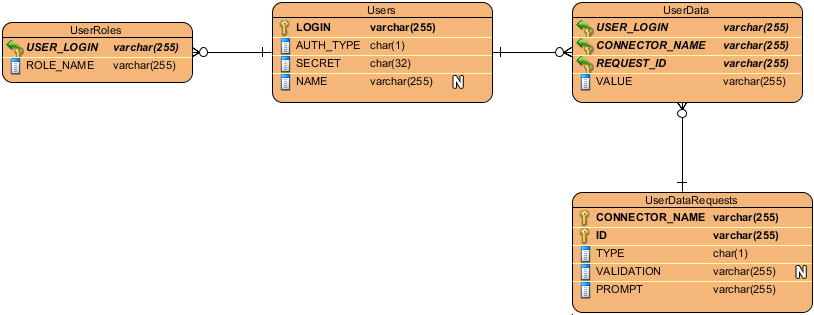
To use Derby in embedded mode it is necessary to add the following to the SERVICEMIX_HOME/conf/jndi.xml file as a child of the beans/util:map element:
<!-- Make the DataSource accessible via this JNDI entry key. Do not change! -->
<entry key="java:comp/env/jdbc/Web2PlatformDb">

  <!-- We access the embedded Derby using its native connection pooling mechanism -->
  <bean class="org.apache.derby.jdbc.EmbeddedConnectionPoolDataSource40">

    <!-- The database name. You can change this although there should be no need to do it. -->
    <property name="databaseName" value="Web2PlatformDb"/>

    <!-- Create the database during the first access.
         Do not change this unless you know what you are doing! -->
    <property name="createDatabase" value="create"/>

    <!-- User login. You can (and should) change this in the production environment -->
    <property name="user" value="web2platform"/>

    <!-- User password. You can (and should) change this in the production environment -->
    <property name="password" value="dbUserPassword"/>

    <!-- Turn on the database encryption. You can (and should) change the bootPassword
         in the production environment -->
    <property name="connectionAttributes" value="dataEncryption=true;encryptionAlgorithm=AES/CBC/NoPadding;bootPassword=dbPassword"/>

  </bean>
</entry>
This way a pre-configured DataSource instance is instantiated automatically and made accessible through JNDI.
When you want to use some other database engine, you have to:
Almost all operations provided by the Web 2.0 Platform have to be invoked by a known, i.e. registered user. We therefore need some kind of authentication. The good news is, that servicemix-http component is ready for authentication out-of-the-box and that it uses a flexible JAAS framework. The bad news is, that the pre-configured authentication mechanism reads authentication data from property files and that the whole Servicemix container is considered a single JAAS domain. All deployables are therefore sharing a single JAAS configuration.
JAAS is very flexible and platform adopters can configure it to authenticate users using LDAP, WinNT, Kerberos and many other common services. As a pre-built solution, we have developed a simple JAAS Login Module capable of authenticating users using the 'Users' database table (see the ERD above). Passwords are not stored in a plain text there, we use an MD5 hash instead.
To enable the pre-built authentication mechanism described above, it is necessary to do two things:
cz.muni.fi.web2platform.core.JAASLoginModule sufficient;
To enable automatic connector registration, copy the web2platform-core-listeners-1.0-SNAPSHOT.jar archive containing the service assembly life cycle listener to the SERVICEMIX_HOME/lib directory (you can find it in the web2platform/core/web2platform-core-listeners/target directory after building the project) and add the following snippet to the SERVICEMIX_HOME/conf/servicemix.xml file as a child of the beans/sm:container element:
<sm:listeners>
  <bean class="cz.muni.fi.web2platform.core.listeners.ServiceAssemblyListenerImpl" />
</sm:listeners>
